
Token Transparency: Why You Should Know Exactly What Your AI SRE Is Doing
AI SRE Token Transparency — How OpsPilot Makes It Work
Every AI SRE platform charges for AI usage in some form. The question is not whether you pay for AI operations — it is whether you can see what you are paying for.
Most AI pricing models in observability and operations tooling are opaque by default. Usage accumulates in the background. Bills arrive at the end of the month. The connection between what the AI did and what it cost is difficult to reconstruct after the fact. For teams that are trying to justify AI SRE investment to engineering leadership, or manage usage against a budget, opacity is a real problem.
OpsPilot’s approach to ai sre token transparency starts from a different premise: every token Coworker uses should be visible, attributable, and paired with the operational value it delivered. Not as an afterthought in a usage report, but in real time, in the dashboard, broken down by source and outcome.
This post is a walkthrough of what that transparency actually looks like — what the dashboard shows, how to read it, and how Coworker manages its own usage to keep it predictable.
What OpsPilot AI Tokens Are
OpsPilot AI Tokens are the monthly allowance for Coworker’s AI-powered work. They measure the AI-powered operational activity Coworker performs on behalf of your team — not a raw LLM cost, but a unit of operational capacity.
Tokens are used when Coworker:
- Investigates an alert, situation, or telemetry pattern
- Runs a scheduled check — an hourly database error rate review, a daily performance summary, a weekly cost trend analysis
- Generates a finding, recommendation, or debrief
- Answers a question in Chat
- Analyzes a trace, correlates signals across services, or updates a situation
Not all Coworker tasks use the same number of tokens. A simple Chat question uses fewer tokens than a deep investigation that reviews telemetry across multiple services, pulls prior findings, considers historical context, and generates a recommended fix. Usage depends on the amount of context and reasoning required.
Each plan includes a fixed monthly allowance. Starter plans include 500 OpsPilot AI Tokens per month. Pro plans include 5,000 tokens per month — appropriate for teams using Coworker continuously across alerts, scheduled checks, recommendations, and operational workflows. A routine week for a Pro plan team typically uses 1,000-1,500 tokens. A challenging week with multiple significant incidents can use significantly more.
What the Dashboard Shows
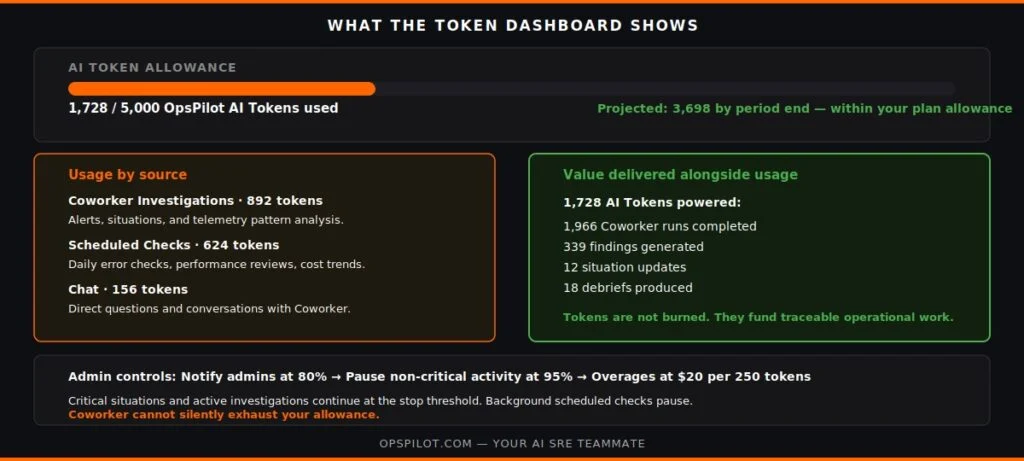
The OpsPilot usage dashboard shows four things at once.
Current usage and projection. The main usage bar shows tokens used against the monthly allowance — for example, 1,728 / 5,000 OpsPilot AI Tokens used. Below that, a projection: Projected usage: 3,698 tokens by period end — within your plan allowance. The projection is calculated from the current usage rate and remaining days in the billing period, so admins can see ahead rather than only see the current position.
Usage by source. The breakdown by source shows where tokens are being spent:
- Chat — AI tokens used by direct questions and conversations with Coworker
- Coworker Investigations — tokens used when Coworker investigates alerts, situations, or service behaviour
- Scheduled Checks — tokens used by recurring Coworker tasks: daily error checks, performance reviews, resource usage analysis
- Recommendations — tokens used to generate suggested fixes, explanations, and next steps
This breakdown makes it immediately visible whether token usage is dominated by background scheduled tasks, by active incident investigation, or by team members using Chat.
Value delivered alongside usage. The principle behind OpsPilot’s transparency is that token usage should never be shown without the operational work it funded. Rather than showing only 1,222 tokens used by Coworker, the dashboard shows: 1,222 AI Tokens powered 1,966 Coworker runs, 339 findings, 12 situation updates and 18 debriefs.
Tokens are not being burned — they are funding specific, traceable operational work. When token usage is high relative to the allowance, the question to ask is not “why did we use so many tokens” but “did the 339 findings and 12 situation updates represent proportionate operational value?” In most cases, for teams with active production systems, the answer is yes.
Controls and limits. Admins can set a monthly cap with two thresholds: a notification threshold at which Coworker alerts admins that usage is approaching the limit, and a stop threshold at which Coworker pauses non-critical activity. The stop threshold ensures Coworker can never silently run away with the allowance — critical behaviour continues; background scheduled checks pause.
How Coworker Manages Its Own Token Usage
One of the less obvious aspects of ai sre token transparency is that Coworker actively tries to stay within allowance without being asked.
After a task has a few runs behind it, Coworker reviews how it has been performing and may suggest a way to get the same work done using fewer tokens:
- Running a slow-moving check less frequently — a check that hasn’t surfaced a finding in 14 consecutive daily runs might be better run weekly
- Switching a straightforward task to a lighter reasoning model
- Sharpening task instructions so Coworker does less wasted context-gathering
- Merging overlapping tasks that are covering the same service from different angles
Each suggestion includes the reasoning behind it and, where possible, an estimated token saving. Admins can accept, dismiss, or defer each suggestion. There is also an auto-accept setting — off by default — that lets Coworker apply its own optimizations automatically.
These suggestions are the savings side of the equation. The allowance controls are the ceiling side. Together, they give admins two layers of management without requiring detailed understanding of how each Coworker task uses tokens.
Why This Matters for AI SRE Adoption
The practical barrier to AI SRE adoption in many engineering organizations is not capability — it is trust and predictability. “We don’t know what it will cost” and “we can’t justify the spend to leadership” are the two most common reasons teams delay deploying an AI SRE platform they have already evaluated positively.
Both barriers are transparency problems, not capability problems. When token usage is opaque, cost is unpredictable. When cost is unpredictable, budget approval is difficult.
OpsPilot’s token transparency model is designed to address both barriers directly. The projection gives teams predictability before they reach the limit. The value-alongside-usage framing gives teams the numbers to justify the spend — not just “we used 3,698 tokens” but “3,698 tokens delivered 339 findings and 12 situation updates in the period.”
For the full usage model across plans, see the pricing page — no form, no sales call. For how Coworker’s three modes affect token consumption, see Coworker Modes. The Coworker page covers how token usage maps to specific Coworker capabilities. For the incident management layer, see AI SRE Platform and Incident Management.
Frequently Asked Questions
A routine week for a team using Coworker actively in Active mode — scheduled checks running, situations being surfaced, recommendations being generated — typically uses 1,000-1,500 tokens. A week with multiple significant incidents, where Coworker is running deep cross-service investigations, can use significantly more. The projection in the dashboard accounts for the current week's usage rate, so teams can see ahead rather than only discover overuse at month end.
Yes. The usage breakdown by source (Chat, Coworker Investigations, Scheduled Checks, Recommendations) gives the category view. Within each category, the task run history shows the individual runs and their token consumption — so if a specific scheduled check is consuming a disproportionate share of the allowance, it is identifiable and adjustable.
Coworker is designed to avoid silent exhaustion. Admins receive notifications as usage approaches the configured threshold. At the stop threshold, non-critical background activity pauses. Active incident situations and in-progress investigations continue. Admins can then choose to add tokens, adjust scheduled check frequency, or wait for the allowance to reset at the next billing period. No critical monitoring stops without an admin decision.
Yes — a scheduled check that runs and finds nothing still uses tokens, because Coworker performed the analysis even when there was no finding to surface. For checks that consistently return no findings, Coworker's token-saving suggestions will typically recommend reducing the check frequency — so the allowance is spent on checks that are more likely to surface something actionable.

See exactly what Coworker is doing — and what it delivered — in real time.
Book a demo → calendly.com/fusionreactor-sales/opspilot-demo
Or start today: Free trial → app.opspilot.com/sign-up
OpsPilot is the AI SRE teammate for teams using OpenTelemetry, Prometheus, Grafana, and existing observability stacks — helping engineers investigate incidents, find root cause, and move toward autonomous operations without replacing their tools. OpsPilot, formerly FusionReactor Cloud, is Intergral’s AI-powered observability and AI SRE platform.