
Self Healing Runbooks Autonomous Remediation: What It Actually Looks Like in Practice
Self healing runbooks autonomous remediation is not a concept that is always 18 months away. In 2026, Coworker’s autonomous remediation capability is in production use — executing approved runbooks without engineer intervention on patterns that have been observed, resolved, and confirmed effective enough times for the team to trust automated execution.
This post is not about the theory of self-healing systems. It is about the practical mechanics of how autonomous remediation actually works — what a self-healing runbook is, how Coworker identifies which patterns are candidates for automation, how the approval process works, and what execution looks like in practice. Including the limits: what autonomous remediation doesn’t do, and where human judgment remains the right answer.
What a Self-Healing Runbook Is
A runbook, in the traditional sense, is a documented procedure — the steps an engineer follows to resolve a specific type of incident. Connection pool exhaustion: increase the pool size and restart the affected service. Rate limit breach: trigger the circuit breaker and alert the upstream team. Memory leak pattern: identify the leaking service, capture a heap dump, and schedule a restart.
A self-healing runbook is a runbook that Coworker can execute autonomously — without an engineer following the steps. The procedure is the same. The execution is automated.
The key distinction from simple alert-triggered automation is that a self-healing runbook in Coworker’s model is not triggered by an alert crossing a threshold. It is triggered by a situation — a pattern that Coworker has detected trending toward an incident. The execution happens before the alert fires, during business hours, before customer impact occurs.
This is what separates autonomous remediation from traditional runbook automation tools. Traditional runbook automation is downstream of the alert — it executes when an alert fires. Coworker’s self-healing runbooks are upstream of the alert — they execute when the pattern is detected, preventing the alert from firing at all.
How Coworker Identifies Runbook Candidates
Not every situation is a candidate for autonomous remediation. Coworker’s process for identifying runbook candidates follows from accumulated incident memory — the operational knowledge Coworker builds from every situation it surfaces and every resolution it observes.
As we covered in AI SRE Incident Memory, incident memory has three components: pattern recognition, resolution history, and runbook approval. Runbook candidacy follows from resolution history — specifically from the combination of pattern recurrence and consistent successful resolution.
A pattern becomes a runbook candidate when three conditions are met:
Condition 1: The pattern has recurred. A pattern that has occurred once may be an anomaly. A pattern that has occurred four or more times is a recurring operational characteristic of the system — predictable, manageable, and a candidate for automated management.
Condition 2: The resolution has been consistent. Each recurrence was resolved by the same action or a small set of equivalent actions. A pattern where each recurrence was resolved differently does not produce a reliable runbook — the resolution is context-dependent and requires engineer judgment. A pattern where each recurrence was resolved by the same action is a candidate for automation.
Condition 3: The resolution has been confirmed effective. The situation did not immediately recur after the resolution action. The resolution was durable — the pattern resolved and stayed resolved for a meaningful period. Resolutions that suppress a symptom temporarily without addressing the underlying cause are not suitable for autonomous execution.
When all three conditions are met, Coworker surfaces the pattern as a runbook candidate in the dashboard, including the proposed automated action, recurrence frequency, historical resolution time, and confidence level based on the consistency of past resolutions.
The Approval Process
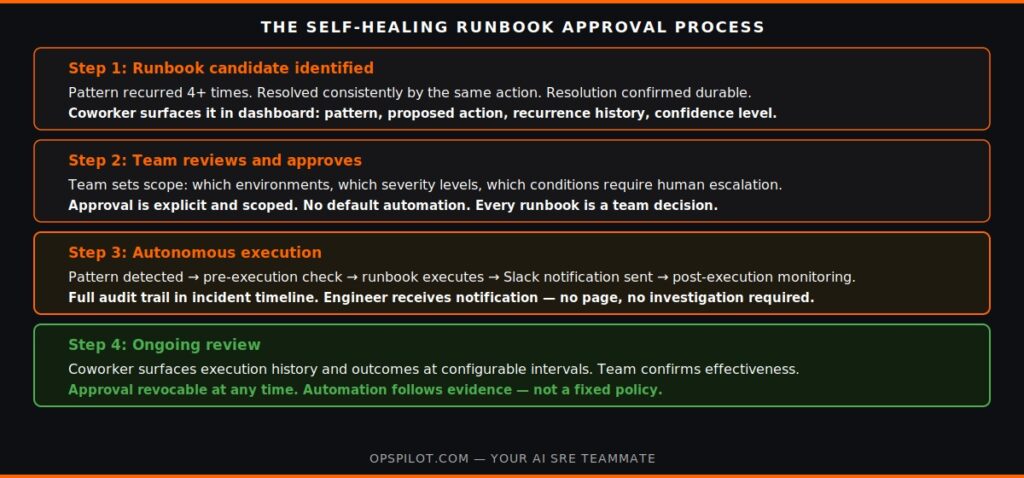
Autonomous remediation in Coworker requires explicit human approval. There is no default automation — every self-healing runbook begins with a team decision to trust autonomous execution for that specific pattern.
The approval process has three steps:
Step 1: Review the candidate. Coworker presents the runbook candidate with full context — the pattern description, the services affected, the historical recurrences, the proposed action, the estimated execution time, and the confidence level. The team reviews whether the proposed action is correct, whether the confidence level is sufficient, and whether the service criticality justifies autonomous execution.
Step 2: Define the scope. Approval is not blanket. The team specifies the execution scope — which environments (production, staging, specific regions), which severity levels trigger autonomous execution, and any conditions that require escalation to a human rather than automated execution. A connection pool exhaustion pattern might be approved for autonomous execution in production for SEV-3 situations, but require human approval for SEV-1 situations even if the pattern matches.
Step 3: Set the review cadence. Approved runbooks are reviewed periodically — Coworker surfaces the execution history and outcome data at configurable intervals so the team can confirm that autonomous execution is continuing to produce the expected outcomes. If execution outcomes change, the team adjusts the runbook or revokes automation.
This approval model is deliberate. The goal is not maximum automation — it is appropriate automation. The patterns that are suitable for autonomous execution are a specific subset of all patterns, and that subset is determined by evidence and team decision rather than by a default policy.
Ready to see which patterns in your stack are ready for autonomous remediation? Book a demo at calendly.com/fusionreactor-sales/opspilot-demo
What Execution Looks Like in Practice
When an approved self-healing runbook is triggered, the execution follows a specific sequence that maintains full auditability alongside autonomous action.
Detection. Coworker detects the pattern trending toward the threshold. This is the same proactive detection that surfaces situations before alerts fire — the difference is that this pattern has an approved runbook.
Pre-execution check. Before executing, Coworker performs a set of pre-execution checks: is the service in a state where the runbook action is safe? Are there any concurrent incidents or changes that would make autonomous execution risky? Is the situation severity within the approved execution scope? If any check fails, Coworker escalates to a human rather than executing.
Execution. The runbook action is executed. The execution is logged in the OpsPilot incident timeline — timestamp, action taken, services affected, execution duration. The engineer on-call receives a notification: “Coworker executed the connection pool expansion runbook for the payment service at 14:23. Resolution confirmed.”
Post-execution monitoring. Coworker monitors the affected service for a configurable period after execution — confirming that the pattern has resolved and not immediately recurred. If the situation recurs within the monitoring window, Coworker escalates to a human and flags the runbook for review.
Audit trail. The full execution is recorded in the incident timeline alongside any manual incidents. Post-mortem requirements are met automatically for autonomous executions, with the execution log substituting for the manual investigation steps that would otherwise be required.
The operational experience for the on-call engineer is: a Slack notification telling them Coworker handled a situation, with a link to the execution log if they want to review it. No page. No 2am investigation. No action required.
For teams currently using OpsPilot’s incident management capability, autonomous executions appear in the incident history with the same auditability as manually resolved incidents. As we covered in AI SRE Platform and Incident Management, the incident management and autonomous remediation layers are designed to work together.
Where Human Judgment Remains the Right Answer
Self-healing runbooks and autonomous remediation are not the right answer for every situation. The limits of autonomous execution are worth being explicit about.
Novel failure patterns. A pattern that Coworker has not seen before — or has seen fewer than four times — does not have the evidence base for autonomous execution. These situations are surfaced to a human with investigation context, not executed autonomously.
High-severity incidents with complex dependencies. A SEV-1 incident affecting multiple critical services simultaneously is not a candidate for autonomous execution regardless of pattern familiarity. Coworker surfaces the situation with maximum urgency and pre-assembled context — the execution is human.
Infrastructure-level changes. Runbook actions that make changes to infrastructure configuration — scaling resources, modifying network rules, adjusting cluster parameters — require human approval for each execution in most team contexts, not just runbook-level approval.
Situations where the pattern is familiar but the context has changed. A connection pool exhaustion pattern that has been successfully remediated six times may have a different cause in the seventh occurrence. Coworker’s pre-execution checks are designed to catch these contextual changes, but the team should review execution outcomes regularly.
For more on where the autonomous remediation capability is heading, see Autonomous SRE. For how the proactive detection layer works in practice, see From Reactive to Proactive SRE.
The Coworker page and pricing page cover the full capability set and tier comparison — no form, no sales call.
Frequently Asked Questions
There is no fixed number — it depends on the team's risk tolerance and the service criticality. In practice, most teams approve autonomous execution for a specific pattern after 5-8 successful manual resolutions using the same action. Lower-criticality services or lower-severity situations tend to reach the approval threshold faster. High-criticality services may require 10+ consistent resolutions before the team is comfortable with autonomous execution.
Yes, at any time. If the team decides that autonomous execution is no longer appropriate for a pattern — because the system has changed, because execution outcomes have varied, or because the team's risk tolerance has changed — the runbook approval is revoked and the pattern returns to requiring human approval for resolution. Revocation is immediate.
If the runbook action fails to execute — due to a technical failure, a permission error, or a pre-execution check not passing — Coworker immediately escalates to a human with the situation context and a note that autonomous execution was attempted and failed. The failure is logged in the execution history. The team can review the failure cause and decide whether to retry, modify the runbook, or revoke autonomous execution for that pattern.
The runbook action library — the set of actions Coworker can execute — is configured during onboarding. Actions are specific to your infrastructure: which API endpoints Coworker is authorized to call, which scaling operations it can perform, which service restart sequences it can execute. This configuration is done once and scoped precisely to the actions the team is comfortable automating. The runbook candidate identification and approval workflow then operates within those pre-authorized action boundaries.
See which patterns in your stack are ready for autonomous remediation.
Book a demo → calendly.com/fusionreactor-sales/opspilot-demo
Or start today: Free trial → app.opspilot.com/sign-up
OpsPilot is the AI SRE teammate for teams using OpenTelemetry, Prometheus, Grafana, and existing observability stacks — helping engineers investigate incidents, find root cause, and move toward autonomous operations without replacing their tools. OpsPilot, formerly FusionReactor Cloud, is Intergral’s AI-powered observability and AI SRE platform.