
Meet Coworker: The AI SRE Tools Your Team Has Been Waiting For
Most AI SRE tools give you more dashboards. More alerts. More data to wade through. Coworker does the opposite.
Coworker is OpsPilot’s AI SRE tool — powered by Claude. Instead of asking you to watch dashboards and chase alerts, it watches your services for you. It investigates what it sees, writes down what it finds, and gives you a clear, prioritized picture of what’s worth your attention right now. It connects to your existing OpenTelemetry, Prometheus, or Grafana stack in minutes — no new agents, no data migration.
This post explains what Coworker is, what it actually does, and why it’s a fundamentally different approach to AI SRE tools.
The Problem With Most AI SRE Tools Today
Most engineering teams in 2026 have more observability data than they know what to do with. Metrics, logs, traces, alerts — all of it collected, all of it sitting in dashboards that somebody has to check.
The promise of AI SRE tools was that AI would do the checking for you. The reality, for most tools, is that AI became another layer of noise — more alerts flagged, more signals to triage, more things to investigate manually.
Sound familiar? See how Coworker handles your stack in a live 30-minute demo — no configuration required on your end. Book a demo →
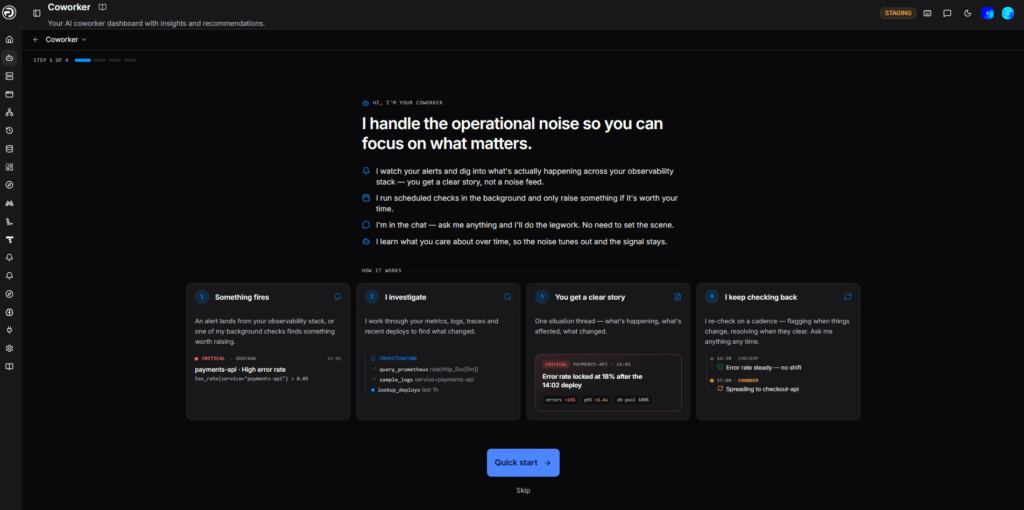
Coworker is built on a different premise: the AI should do the investigation, not just flag that one is needed. It should write down what it found, explain what it means, and tell you whether you need to act — in plain language, without you opening a single dashboard.
What Coworker Actually Does
Coworker behaves like a single teammate. It talks to you in the first person — “I checked the auth-gateway alert,” “I’m escalating this” — remembers context, and keeps working between your visits.
Behind that single voice, three things are happening all the time.
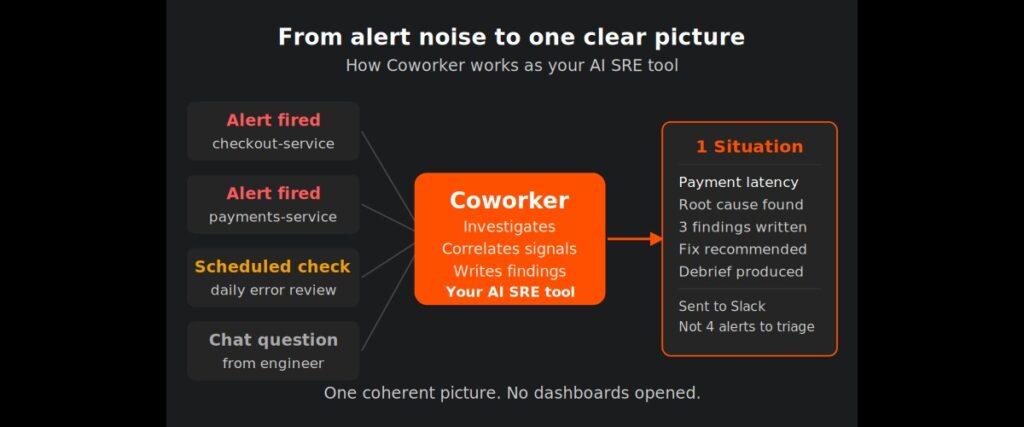
Investigating new signals. When an alert fires or a task you’ve set up runs, Coworker investigates immediately. It pulls the relevant metrics, logs, and traces, writes down what it finds as insights, then decides what to do with the result. Alerts that arrive close together are investigated as a group — a single underlying problem doesn’t become a wall of separate cards.
Tidying up continuously. Every few minutes, Coworker sweeps over active situations and consolidates: merging two situations that turn out to be the same problem, escalating severity when a new signal warrants it, attaching stray findings where they belong.
Re-checking what’s open. Every active situation is re-investigated on a cadence that matches its severity. Criticals get checked roughly every 10 to 15 minutes. Warnings less often. When something resolves — a deploy clears it, a service recovers — Coworker closes it and tells you why. It can also reopen something it had closed if the problem comes back.
Insights and Situations: How Coworker Organizes What It Finds
Two concepts underpin everything Coworker shows you.
Insights are atomic findings — one observation, one anomaly, one error pattern. Coworker writes them automatically whenever it investigates something, whether that’s an alert, a scheduled check, or a webhook event. Each insight has a severity (critical, warning, or info), a category, an affected service, and a short description with the evidence behind it.
Situations are the editorial layer on top. Coworker groups related insights into one coherent story: a title, a plain-language summary, the affected service, the right severity, and what the impact is. Situations are what you triage. And they’re not static — as new insights arrive, Coworker updates, escalates, merges, or closes them automatically.
This is the difference between a noisy alert feed and a useful picture of your operations.
Tasks: Standing Instructions for Your AI SRE Tool
You’re not limited to reactive alert investigation. Tasks are how you give Coworker standing instructions — in plain language, on your schedule.
Three types of task:
Scheduled tasks run hourly, daily, or weekly. “Every morning, check overnight error rates against the previous week.” “Each Monday, review last week’s latency tail.” They keep running until you turn them off, and they’re quiet unless there’s something worth telling you.
Monitoring tasks are temporary. You use them when you want focused attention on something for a while rather than forever — “keep checking the checkout error rate through this rollout,” “watch database connections while we drain the node.” They wind down on their own when the window is up.
Event sources are webhooks. Coworker reacts when something elsewhere fires — a deploy, an incident raised in another tool, an event from a service — and investigates each time.
Every task run does two things at once. It produces the report you set it up for. And while it’s working, Coworker notices anything else worth flagging — creating insights and situations just like an alert would. You can aim a task at a report you want kept current, or purely at finding problems, with no alert needing to fire at all.
It Learns as It Goes
Coworker remembers. The longer it works alongside your team, the more it already knows before it starts looking. Investigations get faster. Its judgment about what’s worth raising gets sharper.
The most direct way to improve it is to correct it. When Coworker raises something that isn’t a problem, dismissing it with a quick reason — “this is expected,” “too noisy” — turns your correction into a lasting fact about your system. Next time Coworker sees the same thing, it won’t raise it.
This is how OpsPilot’s proactive AI capability develops over time — not from static rules, but from a growing understanding of how your specific systems behave.
Coworker vs Traditional AI SRE Tools
Most tools in the AI SRE space do one of two things: they surface more alerts faster, or they build dashboards automatically. Neither solves the core problem, which is that someone still has to investigate.
Coworker does the investigation. It reads the telemetry, forms a view, writes it down, and tells you what it found — in plain language, with the evidence behind it. You get a colleague who has already done the work, not a longer to-do list.
It works on top of your existing stack. If you’re running Grafana, Prometheus, Datadog, or any OpenTelemetry-compatible source, Coworker connects via OTLP in minutes. No rip-and-replace. No new agents. Your existing telemetry investment stays intact — Coworker adds the AI SRE intelligence layer on top.
What Coworker Delivers: A Typical Week
To make this concrete — here’s what a team running Coworker in Active mode typically sees in a week:
- Around 4,000 OpsPilot AI Tokens power the investigations
- Hundreds of Coworker runs completed across alerts and scheduled checks
- Dozens of findings generated, prioritized by severity
- Situations created, updated, escalated, and resolved automatically
- Post-incident debriefs produced without anyone writing them manually
- Suggested fixes delivered directly to Slack, Microsoft Teams, or wherever your team works
The team opens OpsPilot and sees a clear picture of what happened, what Coworker handled, and what needs their attention. Not a wall of alerts to process.
Frequently Asked Questions
What is OpsPilot Coworker? Coworker is OpsPilot’s AI SRE tool — powered by Claude. It investigates alerts, runs scheduled checks, analyzes your OpenTelemetry telemetry, produces findings and debriefs, and suggests fixes. It works alongside your existing stack without replacing any tools.
How is Coworker different from other AI SRE tools? Most AI SRE tools surface more alerts or generate dashboards automatically. Coworker does the investigation itself — reading telemetry, forming a view, writing findings, and telling you what needs attention in plain language. It also learns from your corrections over time, getting sharper the longer it runs.
Does Coworker work with my existing observability stack? Yes. Coworker connects via OpenTelemetry’s OTLP standard. If you’re running Grafana, Prometheus, Datadog, or New Relic, Coworker adds the AI SRE layer on top in minutes — no new agents, no data migration. Read more: OpenTelemetry without intelligence is just expensive data collection.
What’s the difference between an insight and a situation? Insights are atomic findings — one observation, one anomaly. Situations are the editorial layer: Coworker groups related insights into one coherent story with a title, summary, affected service, and impact. Situations are what you triage. Insights are how Coworker writes them.
How quickly can Coworker be set up? Most teams connect their first data source and receive their first AI analysis within 24 hours. If you’re already sending OpenTelemetry data via OTLP, setup typically takes under 5 minutes.
What are OpsPilot AI Tokens? OpsPilot AI Tokens are the monthly allowance for Coworker’s AI-powered work. They are used when Coworker investigates alerts, runs scheduled checks, generates recommendations, or answers questions. Every plan includes a fixed allowance with full usage visibility and forecasting. See pricing →
Start Using the AI SRE Tool Built for Your Stack
Coworker connects to your existing OpenTelemetry data in minutes and starts watching your services immediately.
OpsPilot is the AI SRE teammate for teams using OpenTelemetry, Prometheus, Grafana, and existing observability stacks — helping engineers investigate incidents, find root cause, and move toward autonomous operations without replacing their tools. OpsPilot, formerly FusionReactor Cloud, is Intergral’s AI-powered observability and AI SRE platform.