
Coworker Modes: Reactive, Active, Autonomous — How to Choose the Right One for Your Team
Understanding the coworker AI SRE modes reactive active autonomous starts with knowing that OpsPilot’s Coworker operates at three distinct levels of involvement in your reliability operations. Each mode represents a different level of AI SRE involvement — from a passive intelligence layer that surfaces information on request, to a proactive detection engine that surfaces situations continuously, to a fully autonomous remediation system that resolves approved patterns without engineer intervention.
Most teams don’t start in Autonomous mode. Most teams don’t stay in Reactive mode. The progression through the three modes follows a predictable pattern that is worth understanding before you begin.
This post explains what each mode does, when each is appropriate, and the practical signals that tell you it is time to advance to the next mode.
The Three Coworker Modes
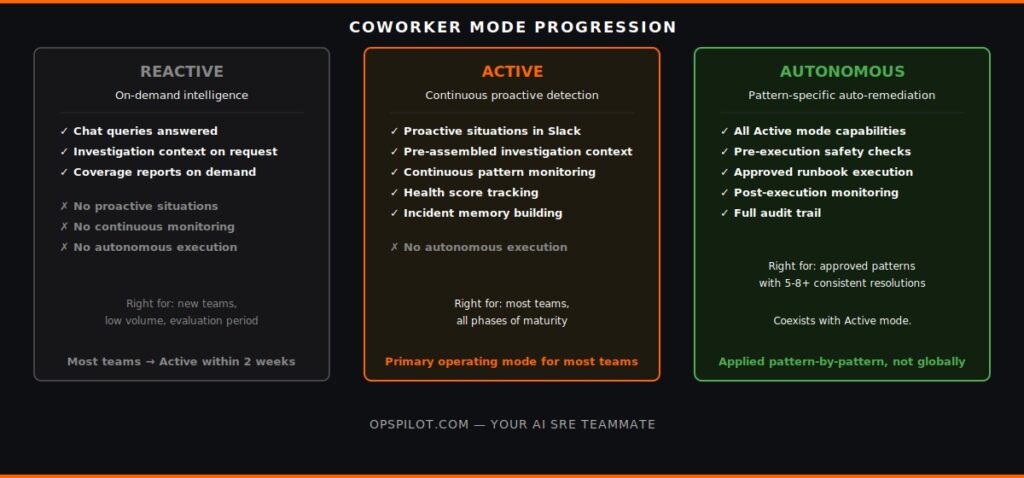
Reactive Mode
In Reactive mode, Coworker functions as an on-demand intelligence layer — answering questions when asked, surfacing context when queried, but not proactively monitoring or surfacing situations without engineer input.
What Coworker does in Reactive mode:
- Responds to OpsPilot Chat queries — engineers ask questions about their production telemetry in plain English and receive specific answers
- Surfaces investigation context when an engineer opens an incident — pre-assembling the correlated signals, affected services, and recommended actions
- Provides historical context when a pattern is queried — showing whether this pattern has occurred before and how it was resolved
- Generates coverage gap reports when requested
What Coworker does NOT do in Reactive mode:
- Proactively surface situations — no unsolicited Slack notifications
- Continuous pattern monitoring — telemetry analyzed on query, not continuously
- Autonomous execution — no runbooks executed without explicit engineer instruction
When Reactive mode is appropriate: New teams evaluating Coworker during the trial, teams with very low incident volume, or teams wanting to understand situation quality before enabling continuous notifications. Most teams move to Active mode within the first two weeks.
Active Mode
In Active mode, Coworker functions as a continuous intelligence layer — watching your production telemetry autonomously, surfacing situations proactively, and delivering investigation context before engineers need to ask for it.
What Coworker does in Active mode:
- Continuous pattern detection across metrics, logs, and traces
- Proactive situation notifications in Slack before alert thresholds are crossed
- Pre-assembled investigation context with every situation — affected service, correlated signals, recommended action, estimated effort, historical context
- Health score tracking — composite reliability score updated continuously
- Coverage gap situations — instrumentation gaps surfaced alongside reliability situations
- Incident memory — recording situations and resolutions to build pattern recognition
What Coworker does NOT do in Active mode:
- Execute remediation actions autonomously — all recommended actions require engineer approval and execution
When Active mode is appropriate: The primary operating mode for most teams. Any team with meaningful incident volume will see immediate value from catching situations before alerts fire. As we covered in Proactive SRE, Active mode represents the most significant operational improvement available to engineering teams in 2026.
Autonomous Mode
In Autonomous mode, Coworker detects patterns, investigates root cause, and executes approved remediation actions without requiring engineer intervention for specific approved patterns.
What Coworker does in Autonomous mode (for approved patterns):
- All Active mode capabilities
- Pre-execution checks — verifying service state, checking for concurrent incidents, confirming severity scope
- Approved runbook execution
- Post-execution monitoring — confirming resolution and watching for recurrence
- Full audit trail in the incident timeline
- Engineer Slack notification — “Coworker executed the connection pool expansion runbook for the payment service at 14:23. Resolution confirmed.”
Important: Autonomous mode is applied pattern-by-pattern, not globally. A team might have 40 active situations in Coworker’s knowledge base, of which 8 have approved runbooks for autonomous execution. The other 32 operate in Active mode. Autonomous coexists with Active — it does not replace it.
When Autonomous mode is appropriate: For specific patterns that have been observed and consistently resolved enough times to trust automated execution. As we covered in AI SRE Incident Memory, the conditions are: pattern recurrence (4+), consistent resolution (same action each time), and confirmed effectiveness (resolution durability). For the full execution mechanics, see Autonomous SRE.
How Teams Progress Through the Modes
Days 1–14 (Reactive → Active transition): Most teams start in Reactive mode for the first few days — using Chat to explore telemetry investigation and reviewing the coverage gap report. The majority transition to Active mode within the first week after seeing the first situation Chat surfaces that would have required manual querying to find.
Weeks 2–12 (Active mode — baseline and pattern accumulation): Coworker builds baselines, accumulates pattern history, and develops incident memory. The team works through the situations Coworker surfaces — validating recommendations, confirming resolutions, dismissing false positives. Each interaction improves calibration to the team’s specific stack and risk tolerance.
Months 3–6 (Active mode — runbook candidate identification): Pattern history accumulates and Coworker begins identifying runbook candidates — patterns that have recurred consistently with consistent successful resolution. These appear in the dashboard as candidates for autonomous execution approval.
Month 6+ (Autonomous mode — progressive expansion): First autonomous approvals are typically for the lowest-risk, highest-confidence patterns. As autonomous execution proves reliable, the team expands scope — additional patterns, additional environments, wider severity range.
This progression is not mandatory — teams can remain in Active mode indefinitely and receive significant operational value. Autonomous mode is appropriate when the evidence and risk tolerance support it, not before.
Ready to configure Coworker for your team? Book a demo at calendly.com/fusionreactor-sales/opspilot-demo
Choosing the Right Starting Mode
Three questions determine the right starting configuration:
What is your current incident volume? Teams with fewer than 3 incidents per month may find Active mode adds notification overhead without proportionate value — Reactive mode plus Chat may be the right long-term configuration. Teams with 5+ incidents per month will see immediate value from Active mode’s proactive detection.
What is your team’s appetite for AI-surfaced notifications? Some teams have notification fatigue from existing alerting and want to evaluate Coworker’s situation quality before enabling continuous notifications. Starting Reactive for one to two weeks, then transitioning to Active once situation quality is understood, manages this transition effectively.
Do you have existing runbooks that could be automated immediately? If your team has well-documented runbooks for recurring patterns executed many times, some may be ready for Autonomous mode earlier than the standard 5-8 execution threshold. The evaluation framework is covered in AI SRE Platform Evaluation.
For the full capability set across all three modes, see the Coworker page and Proactive AI page. For pricing — no form, no sales call — see the pricing page.
Frequently Asked Questions
Yes. Mode changes do not affect accumulated incident memory, pattern history, or approved runbooks. Switching from Active to Reactive mode pauses proactive notifications but preserves all accumulated context. Switching back to Active mode resumes notifications from the point of the switch. Pattern history and runbook approvals are persistent regardless of mode changes.
Coworker's three modes are not separately priced — all three are available within each OpsPilot plan. The mode is a configuration choice, not a pricing tier. See the pricing page for the plan comparison — no form, no sales call.
Yes. Mode configuration can be applied at the service level, not just globally. A team might run tier-1 services in Active mode while piloting Autonomous mode for lower-criticality services. This is the recommended approach for the initial Autonomous mode expansion — confine early autonomous execution to a specific service subset before extending to the full production environment.
Situations that are actively open when a mode change occurs continue to be tracked and updated. If a team switches from Active to Reactive mode while a situation is in progress, the situation remains visible and resolvable in the dashboard — it simply no longer generates new proactive notifications until Active mode is re-enabled.
Configure Coworker for your team’s current maturity and risk tolerance.
Book a demo → calendly.com/fusionreactor-sales/opspilot-demo
Or start today: Free trial → app.opspilot.com/sign-up
OpsPilot is the AI SRE teammate for teams using OpenTelemetry, Prometheus, Grafana, and existing observability stacks — helping engineers investigate incidents, find root cause, and move toward autonomous operations without replacing their tools. OpsPilot, formerly FusionReactor Cloud, is Intergral’s AI-powered observability and AI SRE platform.