
Meet OpsPilot Integrations: Bring Your Whole Stack Into the Picture
How OpsPilot Integrations Connect Your Observability Stack to OpsPilot Coworker
Your infrastructure doesn’t live in one place — and with OpsPilot Integrations, your view of it doesn’t have to either.
Your applications, cloud services, infrastructure, telemetry and communication tools all produce useful information — but that information is often spread across different systems. That makes understanding what is actually happening across your environment harder than it needs to be.
OpsPilot Integrations are designed to bring those pieces together. Integrations connect the tools and technologies you already use with OpsPilot, providing you a simpler way to bring more of your environment into one place — and giving OpsPilot Coworker more context to work with.
Connect the Stack You Already Have
The Integrations Hub gives you a central place to connect OpsPilot to the technologies that make up your environment — from cloud platforms and infrastructure to databases, frameworks, application telemetry and the tools your team works in every day.
Integrations currently span areas including cloud, infrastructure, data, SDKs, chat and ticketing, with more being added over time.
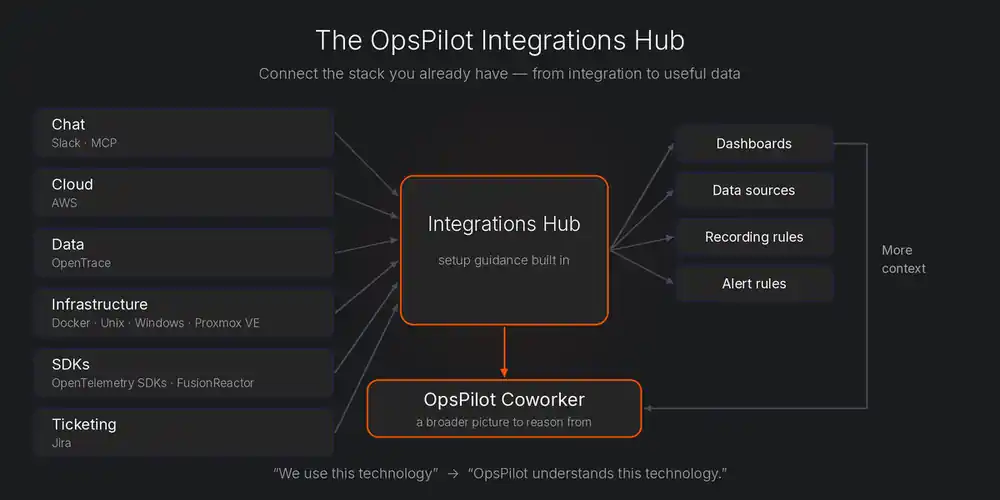
But connecting an integration isn’t just about making two products talk to each other.
Depending on the technology, an integration can give OpsPilot access to relevant data and provide resources such as dashboards, data sources, recording rules and alert rules. Where additional configuration is needed, OpsPilot can also guide you through the setup.
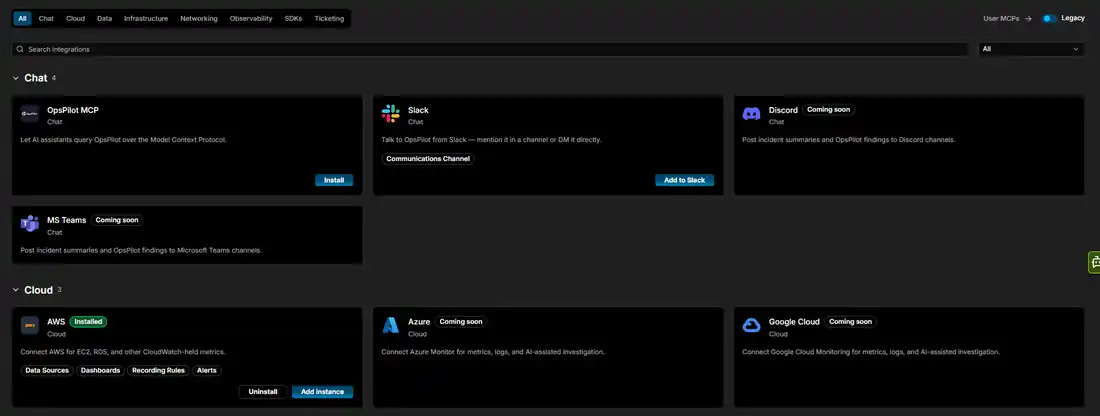
For example, connecting AWS can bring AWS data into OpsPilot alongside dashboards for exploring it. Infrastructure integrations can help bring metrics from systems such as Docker, Windows and Unix into the same observability environment.
This makes it easier to go from:
“We use this technology.”
to:
“OpsPilot understands this part of our environment.”
And that understanding becomes even more valuable when OpsPilot Coworker starts working with it.
More Context for OpsPilot Coworker
This is where Integrations become much more important than a collection of connectors. Every new source of information gives OpsPilot Coworker more context about the environment it is helping you monitor.
Connect AWS and OpsPilot Coworker can work with the AWS information available to it, such as EC2, RDS and other CloudWatch-held metrics.
Connect your infrastructure — Docker, Unix, Windows or Proxmox VE — and OpsPilot Coworker can see how the hosts and containers underneath your applications are behaving. That matters during an investigation: when a service slows down, it helps separate a problem in the application from a problem in the machine or container it runs on.
Connect OpenTrace and OpsPilot Coworker gets context about your code, not just your telemetry. OpenTrace maps your system’s architecture, code structure and service relationships into a knowledge graph. With that context, OpsPilot Coworker can connect what it sees in production to the services and code behind it — which components depend on each other, and what else might be affected when something goes wrong.
As more integrations are connected, OpsPilot Coworker has a broader picture to reason from — the same principle behind incident memory and complete observability coverage. Instead of an AI assistant sitting beside your observability data, the goal is OpsPilot Coworker — an AI teammate that can actually work with that data.
Bring OpsPilot to Where You Already Work
Integrations also work in the other direction. You shouldn’t always have to open OpsPilot to find out what’s happening.
With the Slack integration, for example, you can interact with OpsPilot from Slack. Alerts and situations can also reach you there, bringing important information into a tool your team may already have open throughout the day.
The OpsPilot MCP integration extends that idea into AI and development environments, allowing you to interact with OpsPilot from supported MCP clients such as Claude, ChatGPT and VS Code.
That changes the relationship with your observability platform. Instead of open monitoring tool → find dashboard → inspect data → work out what it means, you can start with the question you actually want answered:
- “What’s happening with this service?”
- “Are there any problems I need to know about?”
- “What’s the load on this service?”
And ask OpsPilot Coworker from the environment where you’re already working — the same plain-English approach we covered in OpsPilot Chat.
Dashboards Are Still There When You Need Them
Automation doesn’t mean losing access to the underlying information. Integrations can provide dashboards designed around the technologies you’ve connected, giving you a way to explore the data yourself whenever you need to. For example, an AWS integration can provide AWS-specific dashboards, while an OpenTelemetry Go integration can provide dashboards for the relevant Go metrics.
That distinction is important. The data is still available for you to inspect. You just don’t always have to be the one inspecting it. OpsPilot Coworker can use that same wider pool of information to help understand what is happening across your environment.
Integrations, Alerting and OpsPilot Coworker
This is also where the bigger OpsPilot story starts to take shape.
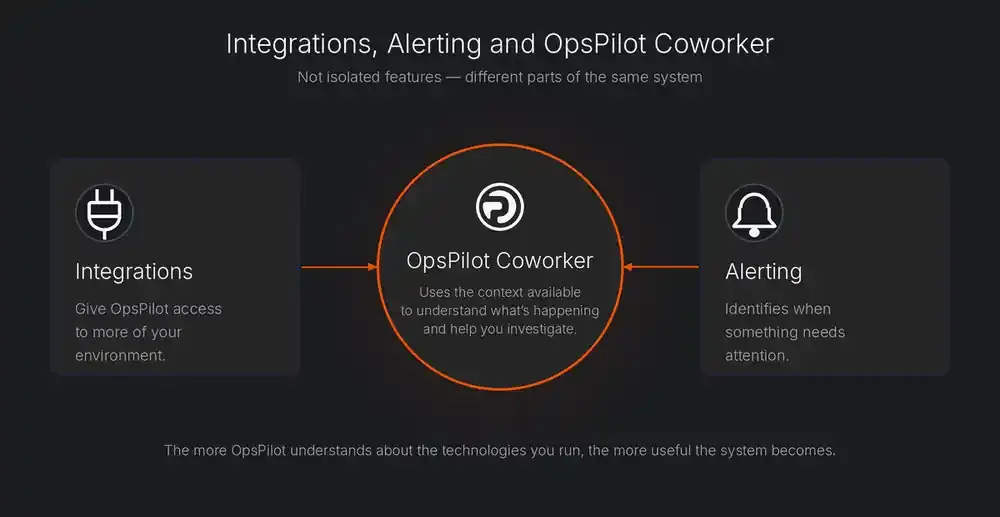
Learn more about Alerting and OpsPilot Coworker.
They’re not isolated features. They’re different parts of the same system. The more OpsPilot understands about the technologies you run, the more useful that system can become.
Your Stack. More Connected.
Observability shouldn’t mean spending your day moving between tools and trying to assemble the complete picture yourself. Your environment already contains the information you need.
OpsPilot Integrations are about connecting that information, making it accessible, and giving OpsPilot Coworker the context it needs to put it to work. Connect the tools you already use. Bring more of your environment into the picture. And let OpsPilot Coworker do more with it.
See the OpsPilot Coworker page for the full capability set, or check pricing — no form, no sales call.
Frequently Asked Questions
No. Integrations are designed to connect the tools and technologies you already use, such as AWS, Slack, Jira, Docker and OpenTelemetry SDKs, and make their information more useful inside a connected observability workflow.
Depending on the integration, OpsPilot can provide dashboards, data sources, recording rules and alert rules for that technology, plus built-in setup guidance where extra configuration (such as configuring Alloy to collect metrics) is needed.
Every connected source gives OpsPilot Coworker more context about your environment. The more integrations you connect, the broader the picture OpsPilot Coworker has to reason from when helping you understand and investigate what is happening.
Yes. The Slack integration lets you interact with OpsPilot and receive alerts and situations in Slack, and the OpsPilot MCP integration lets you work with OpsPilot from supported MCP clients such as Claude, ChatGPT and VS Code.
Your stack. More connected. See OpsPilot Integrations and OpsPilot Coworker in action.
Or start today: Start free trial
OpsPilot is the AI SRE teammate for teams using OpenTelemetry, Prometheus, Grafana, and existing observability stacks — helping engineers investigate incidents, find root cause, and move toward autonomous operations without replacing their tools. OpsPilot, formerly FusionReactor Cloud, is Intergral’s AI-powered observability and AI SRE platform.