
What an AI SRE Teammate Actually Does — And Why It's Not What the Vendors Are Selling You
Every observability vendor now has an AI SRE teammate story.
The language is consistent: autonomous operations, proactive intelligence, AI that works alongside your engineers. The demos are compelling. The product pages are confident. And yet the engineering teams that have bought these promises often find themselves in the same position six months later — still doing manual triage, still investigating alerts at 2am, still spending the majority of SRE time on reactive work.
The gap between the AI SRE teammate promise and the AI SRE teammate reality is real. Understanding it is the difference between a purchasing decision that transforms how your team operates and one that adds a new dashboard to the pile.
This post is about what a genuine AI site reliability engineering (AI SRE) teammate actually does — specifically, what Coworker does — and the three questions that separate real capability from a well-produced vendor narrative.
What “AI SRE Teammate” Actually Means
The AI SRE teammate framing was validated by Gartner as the most effective way to communicate what this category of tooling does — because it communicates augmentation rather than replacement, and collaboration rather than automation.
A teammate is not a tool you query. A teammate is not a dashboard you check. A teammate is someone — or something — that handles their share of the work so you can focus on yours. The work an AI SRE teammate handles is the pattern-matching, signal-correlation, and routine analytical work that consumes 40-50% of SRE time without requiring the judgment that makes SRE engineers valuable.
As we explored in AI SRE: What It Actually Means for Your Engineering Team in 2026, the test is simple: after the AI does its work, how much does your engineer still have to do manually? If the answer is “roughly the same,” you have an AI-branded tool. You do not have an AI SRE teammate.
What a Genuine AI SRE Teammate Does
OpsPilot’s Coworker is the AI SRE teammate built specifically for teams running OpenTelemetry, Prometheus, and Grafana. Here is what it actually does — in concrete operational terms, not marketing language.
It watches your production system continuously without being asked.
Coworker runs three background loops against your OTLP telemetry at all times. It investigates new signals as they arrive — alerts that fire, scheduled tasks that run, events from configured webhooks. It tidies up continuously — merging related findings into coherent situations, escalating severity when new signals warrant it, and resolving situations when the data shows the problem has cleared. And it re-checks every open situation on a cadence based on severity — criticals reviewed every 10-15 minutes, warnings less frequently.
This continuous operation is what makes proactive detection possible. As we covered in From Firefighting to Prevention, the patterns that precede 95% of production incidents are visible in telemetry data before thresholds are crossed. Continuous watching finds them. Periodic querying does not.
It produces situations, not more data.
When Coworker identifies something worth your team’s attention, it does not generate another dashboard or alert. It writes an insight — one specific observation, with evidence — and groups related insights into a situation: a title, a plain-language summary, the affected service, the right severity, the business impact, and a recommended action.
Situations are what your team triages. Not raw metrics. Not log streams. Not a list of anomalies that all look equally important. A prioritized, editable, continuously updated picture of what is actually happening in your production system right now. The most urgent situations are at the top. A calm situation list means Coworker has checked and found nothing worth raising.
It learns your system specifically.
Coworker builds baselines from your specific telemetry — your traffic patterns, your service behavior, your normal state. Its judgment about what is worth raising improves the longer it operates. When you correct it — dismissing a situation with a reason — it creates a lasting fact about your system and does not surface the same false positive again.
This learning capability is what makes Coworker more valuable the longer it runs. It is not applying generic rules to your data. It is developing a model of your system’s normal state and flagging meaningful deviations from it.
It speaks in plain language and delivers to where your team works.
Coworker talks in first person: “I checked the auth-gateway alert and found the connection pool at 89% — trending toward exhaustion based on the last 6 hours. I’m recommending an increase to the pool size from 20 to 35. Estimated effort: 15 minutes.”
This is not a summary of metrics. It is a conclusion with a recommendation. It arrives in Slack or Microsoft Teams — where your team already works — and it contains everything the engineer needs to act, without opening a single dashboard.
See what Coworker finds in your stack in the first 24 hours. Book a demo at calendly.com/fusionreactor-sales/opspilot-demo
What Most “AI SRE Teammate” Claims Actually Deliver
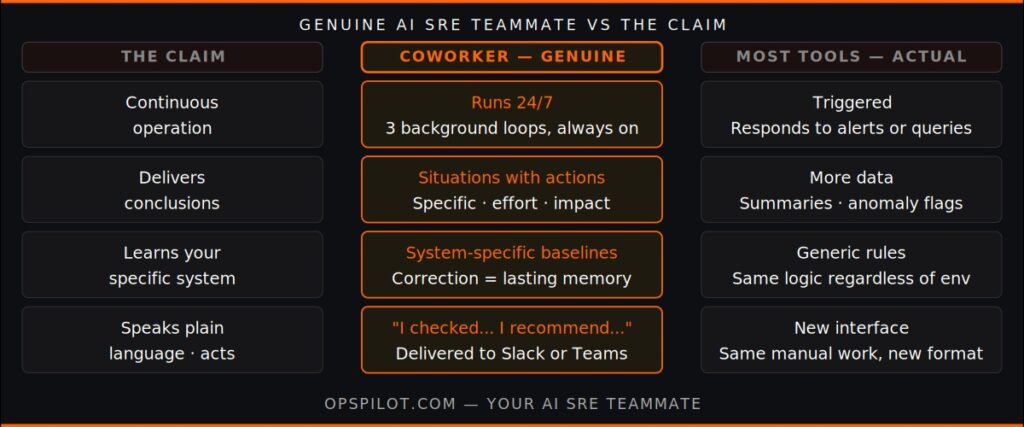
The gap between genuine AI SRE teammate capability and the claims made under that label comes down to three distinctions.
Continuous vs triggered.
A genuine AI SRE teammate runs continuously without being prompted. It does not wait for an alert to fire or a query to be submitted. It maintains awareness of your production system’s state at all times and surfaces situations proactively.
Most “AI SRE” features are triggered — they respond to alerts, process queries, or generate summaries of events that have already occurred. This is AI assistance with reactive operations. It is not an AI SRE teammate.
Conclusions vs more data.
A genuine AI SRE teammate delivers conclusions — specific situations with specific recommended actions. The engineer who receives a Coworker situation does not need to do investigation work. The correlation has been done. The dependency chain has been followed. The recommendation is specific.
Most “AI SRE” features deliver more data in a more accessible format. Natural language queries make log exploration easier. AI-generated summaries make alert context faster to read. These are useful. They are not conclusions. The investigation is still manual.
System-specific vs generic.
A genuine AI SRE teammate learns your system. Its detection improves over time as baselines mature. Its correction mechanism — dismiss with a reason — creates lasting facts about your specific environment.
Most “AI SRE” features apply generic models to your data. The same anomaly detection logic, the same alert correlation rules, regardless of how long the tool has been operating on your specific environment. There is no learning. There is no system-specific context.
The Three Questions
Before accepting any AI SRE teammate claim, ask three questions.
Does it run when nobody is asking?
Log in and do nothing. Come back tomorrow. Has the system done anything? Has it surfaced situations? Has it updated its understanding of your production system’s state? If the answer is no — if the tool only acts when prompted — it is not an AI SRE teammate. It is a smart query interface.
What did it produce in the last 24 hours?
Ask the vendor to show you what the system surfaced proactively in the last 24 hours for a comparable customer environment. Not what it showed when someone queried it. What it identified and raised without being asked. A genuine AI SRE teammate has a daily output of situations — findings it surfaced proactively. A tool with AI features has query results.
Does it learn from corrections?
Ask how the system responds when it surfaces a false positive. Does dismissing it affect future behavior? Is there a correction mechanism that creates lasting system-specific knowledge? A genuine AI SRE teammate gets better over time on your specific environment. A tool with AI features applies the same logic regardless of what you’ve told it.
Coworker answers all three. It runs its three background loops continuously regardless of whether anyone is logged in. It surfaces situations every day — a typical week produces a mix of cost optimizations, performance patterns, and reliability findings. And its correction mechanism — dismiss with a reason — creates a lasting fact about your system that Coworker carries forward into every subsequent investigation.
The Teammate Difference in Practice
The clearest illustration of what a genuine AI SRE teammate changes is the on-call handoff.
Without Coworker, the incoming on-call engineer receives a period summary and starts from scratch — reviewing open alerts, checking dashboards, piecing together context that the outgoing engineer carries in their memory.
With Coworker, the incoming engineer opens their situation feed. Active situations at the top, each with Coworker’s investigation notes attached. Watching situations below — things Coworker is monitoring but not asking anyone to act on yet. Resolved situations at the bottom, closed automatically when the data showed the problem cleared.
The handoff takes minutes instead of 30. The context is complete and written down. The engineer’s first action is a decision — not an investigation.
As we covered in What an AI SRE Teammate Actually Does, this is the consistent experience reported by teams that have made the transition. The work does not disappear. It moves — from manual orientation and triage to judgment and decision, where SRE expertise actually belongs.
For more on how the AI SRE teammate category is developing, see the AI SRE page and Meet Coworker.
FAQ
How is Coworker different from AI features in other observability platforms? The core difference is whether the AI runs continuously without being prompted and delivers conclusions rather than more data. Coworker’s three background loops run at all times, maintaining awareness of your production system’s state and surfacing situations proactively. Most AI features in observability platforms respond to queries or alert events — the investigation is still manual.
What does a typical day of Coworker output look like? A typical day produces a mix of findings depending on your system’s state: cost optimization opportunities from resource utilization data, performance patterns worth monitoring, reliability situations requiring action, and instrumentation gaps identified in your coverage. On a quiet day, a calm situation list. On an active day, prioritized situations for your team to triage.
How long before Coworker’s detection becomes system-specific? Initial baseline establishment takes approximately one week as Coworker learns your traffic patterns and normal service behavior. The correction mechanism — dismiss with a reason — applies immediately and creates lasting system-specific facts from day one. Most teams report that detection precision improves noticeably over the first month.
Does Coworker replace on-call rotation? No. Coworker reduces the cognitive burden of on-call by doing the continuous watching and initial investigation work. On-call engineers still make decisions, run incident command, and handle the judgment-intensive work that requires human expertise. The on-call experience improves — less noise, better context, fewer 2am pages for situations that could have been resolved during business hours.
See what a genuine AI SRE teammate does in your stack.
Book a demo → calendly.com/fusionreactor-sales/opspilot-demo
Or explore first: Start your free trial → app.opspilot.com/sign-up
OpsPilot is the AI SRE teammate for teams using OpenTelemetry, Prometheus, Grafana, and existing observability stacks — helping engineers investigate incidents, find root cause, and move toward autonomous operations without replacing their tools. OpsPilot, formerly FusionReactor Cloud, is Intergral’s AI-powered observability and AI SRE platform.