
The Engineer Who Never Sleeps: What an Autonomous SRE Teammate Looks Like at 3am
It is 3:17am on a Wednesday — and your autonomous SRE teammate has been working for hours.
Your engineers are asleep. Your on-call engineer is asleep — the rotation has been quiet this week. Your dashboards are dark. Nobody has queried a metric since 11pm.
Your production system is not quiet.
Between 11pm and 3am, three things happened that matter. A connection pool on the payments service started trending upward — it was at 61% at midnight, 74% at 2am, and is now at 82% on a trajectory that reaches exhaustion before the morning standup. A scheduled batch job that runs at 2am completed 40% slower than its baseline. And a third-party dependency showed a latency increase that, by itself, is within acceptable bounds — but correlates with a pattern that preceded a cascade failure six weeks ago.
None of these have crossed an alert threshold. Your Alertmanager rules haven’t fired. PagerDuty is silent.
But your autonomous SRE teammate has been watching all of it.
This is what autonomous site reliability engineering (autonomous SRE) actually means in 2026 — not a system that replaces your engineers, but one that does the continuous watching and pattern-matching work that human engineers cannot sustain at 3am, and that most observability tools are not designed to do at all.
What “Autonomous SRE” Actually Means
The word autonomous has accumulated baggage in the AI conversation. It conjures images of systems making consequential decisions without human input — which is precisely what most engineering leaders do not want from their production operations tooling.
Autonomous SRE in practice means something more precise and more useful: a system that operates continuously without human prompting, identifies what matters in your telemetry, and surfaces specific conclusions — situations with recommended actions — without requiring an engineer to be awake, logged in, or actively monitoring to trigger the analysis.
The autonomy is in the watching and the detecting. The decision to act remains with your engineer.
OpsPilot’s Coworker is moving in this direction — agentic operations, where Coworker takes defined autonomous actions within configured boundaries rather than only recommending them, is the architectural direction. For most teams in 2026, the practical value is already substantial: a system that watches your production telemetry through the night, identifies what warrants attention, and has the situations written up and prioritized before your engineers arrive in the morning.
As we explored in What an AI SRE Teammate Actually Does, the three questions that distinguish genuine autonomous SRE capability from AI-branded monitoring tools are whether it runs when nobody is asking, what it produced in the last 24 hours, and whether it learns from corrections. At 3am, the first question is the only one that matters.
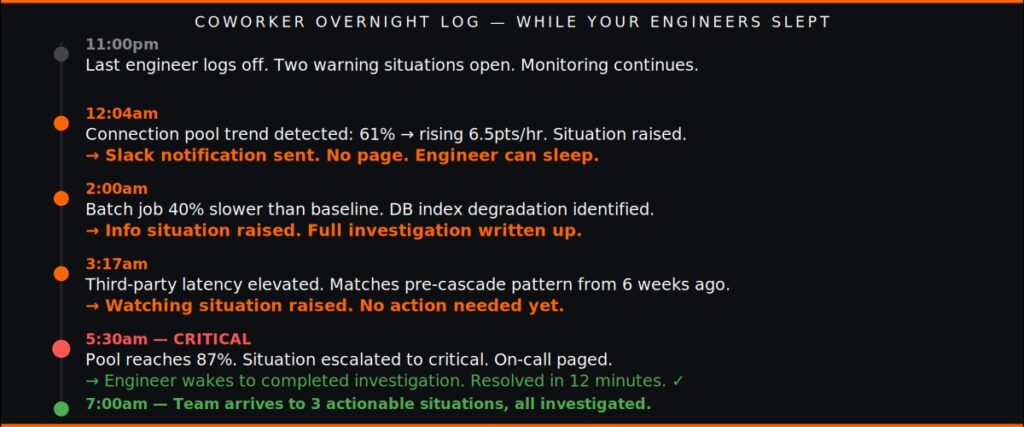
What Coworker Did Last Night
11:00pm — Shift begins
The last engineer logs off. Coworker continues its three background loops: investigating new signals, tidying up open situations, and re-checking active findings. The situation feed shows two active situations from the day — both at warning severity, both being watched. No criticals.
11:47pm — Batch job completes
A scheduled task that runs every night at 11:30pm completes. Coworker reviews the output, compares it against baseline performance from the previous 14 runs, and notes that duration was within normal range. Nothing worth surfacing. The situation feed remains calm.
12:04am — Connection pool signal detected
Coworker’s continuous analysis indicates that the payments-service connection pool, currently at 61%, has been rising at approximately 6.5 percentage points per hour since 10pm. At this rate it will reach 90% — the threshold at which connection exhaustion becomes likely — at approximately 5:30am.
Coworker writes an insight: connection pool trending toward exhaustion, evidence shows consistent upward slope over 130 minutes, pattern matches pre-exhaustion signatures from similar services. It raises a new situation — warning severity, active status — and delivers it to the team’s Slack channel. The message is specific: affected service, current value, projected threshold crossing time, recommended action (increase pool size from 25 to 40), estimated effort (15 minutes).
The Slack notification goes to the team channel, not the on-call pager. This is a warning, not a critical. It can wait for business hours.
2:00am — Scheduled batch job: anomaly
The nightly billing reconciliation batch job completes. Coworker reviews the run duration — 23 minutes, compared to a 14-day baseline of 16.4 minutes, a 40% slowdown. It investigates: pulls the relevant metrics, examines whether database query times changed during the run window, checks whether concurrent processes were competing for resources. It finds that a database index that was working efficiently last week has degraded — a pattern consistent with table growth reaching a point where the query plan changes.
Coworker raises a new situation — info severity — with the finding, the evidence, and a recommendation to run ANALYZE on the affected table. It attaches the situation to the batch job’s task history.
3:17am — Third-party dependency pattern
Coworker’s re-checking loop reviews the latency data from a third-party payment processor. Current p99 latency: 340ms, up from a 14-day baseline of 210ms. Within contractual bounds. But Coworker’s pattern memory includes the cascade failure from six weeks ago — which began with a similar latency increase from this dependency. It raises a watching situation: third-party dependency latency elevated, within bounds but matching pre-cascade pattern from prior incident. No action required now; monitoring closely.
5:30am — Connection pool: escalated
The connection pool situation is updated. The pool is now at 87% — the trajectory held. Coworker re-investigates: pulls current connection counts, confirms the trend has continued, identifies that a specific service process accounts for the majority of the growth. It escalates the situation from warning to critical severity. The on-call pager fires — but Coworker’s investigation is already complete. The on-call engineer wakes to a situation that tells them exactly what is happening, why, and what to do. They resolve it in 12 minutes and return to sleep.
7:00am — Team arrives
The incoming team opens the situation feed. One critical resolved overnight — connection pool exhaustion caught before full impact, resolved at 5:43am. Two new situations: the batch job performance degradation and the third-party dependency pattern. Both are written up with full investigation context. The team’s first standup has specific, actionable items with evidence already assembled.
This is autonomous SRE.
Ready to see what Coworker finds in your stack overnight? Book a demo at calendly.com/fusionreactor-sales/opspilot-demo
Why Overnight Is When It Matters Most
The pattern that causes a 2am outage is almost never sudden. As we documented in The 7 Patterns Behind 95% of Production Failures, the most common production failures follow visible precursors — trends, growth curves, dependency degradation — that are present in telemetry data hours or days before impact.
The overnight window is when these patterns develop without anyone watching. During business hours, engineers are logging in, querying metrics, checking dashboards. The probability that someone happens to notice a concerning trend is non-trivial. Between 11pm and 7am, it approaches zero.
Autonomous SRE closes this window. Not by keeping engineers awake — but by having something that doesn’t need sleep doing the watching that human attention cannot sustain continuously.
The result is not the elimination of on-call. Novel failures still occur. Sudden degradations still require human response. What autonomous SRE eliminates is the category of 2am pages that represent the overnight development of patterns that were catchable — the majority of production incidents, as we covered in SRE On-Call 2026.
The Difference Between Autonomous SRE and Automated Alerting
Automated alerting fires when conditions are met. Autonomous SRE watches for the conditions forming.
This distinction matters at 3am because the connection pool situation described above never crossed an alert threshold until 5:30am. Alertmanager, configured to fire at 90%, would have fired at 5:30am — after the pattern had been developing for seven hours, during the window when response is most disruptive and least effective.
Coworker identified the trend at midnight — five and a half hours earlier — because it was watching the trajectory, not waiting for the threshold.
The on-call engineer’s experience is the clearest illustration of the difference. With automated alerting: woken at 5:30am by an urgent alert requiring immediate investigation. With autonomous SRE: woken at 5:30am by a critical situation that Coworker has already investigated, with the root cause identified and the recommended action specific. Twelve minutes to resolution instead of seventy-five.
And in the version of this night where Coworker’s earlier warning is acted on during business hours the previous day — the 5:30am page never fires at all.
For more on the architecture of how Coworker operates overnight, see From Firefighting to Prevention and the AI SRE capability page.
FAQ
Does autonomous SRE mean Coworker makes decisions without human approval?
No. Coworker identifies patterns, raises situations, and recommends specific actions — but the decision to act remains with your engineer. Autonomy lies in continuous monitoring and detection, not in executing changes. The direction of travel is toward agentic operations, where Coworker can take defined autonomous actions within configured boundaries, but for most teams in 2026 the value is in proactive detection and recommendation delivery.
What happens if Coworker raises a false positive overnight?
If the on-call engineer reviews a situation and it turns out to be a false positive, dismissing it with a reason creates a lasting fact about your system. Coworker remembers and does not surface the same pattern again. The correction mechanism is how Coworker’s overnight accuracy improves over time — it learns what is and isn’t worth raising for your specific system.
Does Coworker page the on-call engineer for every situation it raises overnight?
No. Coworker delivers situations by severity. Warning and info situations go to the team Slack channel — they are visible in the morning but do not trigger pager alerts. Only critical situations trigger the on-call pager. In the scenario above, the connection pool situation was raised as a warning at midnight (Slack notification, no page) and escalated to critical at 5:30am when the threshold was imminent (pager notification). The engineer was woken once, not twice.
How does Coworker know what counts as a concerning trend vs normal variation?
Coworker builds baselines from your specific telemetry — your traffic patterns, your service behavior, your normal overnight load profiles. Overnight traffic patterns differ from business hour patterns, and Coworker accounts for this. A connection pool at 82% during a high-traffic business day may be expected. The same value at 3am on a low-traffic night, rising, is anomalous against the established baseline.
Your engineers need sleep. Coworker doesn’t.
Book a demo → calendly.com/fusionreactor-sales/opspilot-demo
Or explore first: Start your free trial → app.opspilot.com/sign-up
OpsPilot is the AI SRE teammate for teams using OpenTelemetry, Prometheus, Grafana, and existing observability stacks — helping engineers investigate incidents, find root cause, and move toward autonomous operations without replacing their tools. OpsPilot, formerly FusionReactor Cloud, is Intergral’s AI-powered observability and AI SRE platform.